FX Luminaire
FX Luminaire LUMAKEY Utility Luxor Wireless Fixture Assignment Tool (LUMA KEY)
FX Luminaire LUMAKEY Utility Luxor Wireless Fixture Assignment Tool (LUMA KEY)
SKU:LUMAKEY
Couldn't load pickup availability
For contractors and dealers: we're here for compatibility checks, substitutions, and large mixed orders whenever we can support them fairly.
Need manual review or a coordination call? Message us—we work within thin margins so some setups are scoped case-by-case.
- Built for contractor buying
- Fast shipping on in-stock
- Product & project help
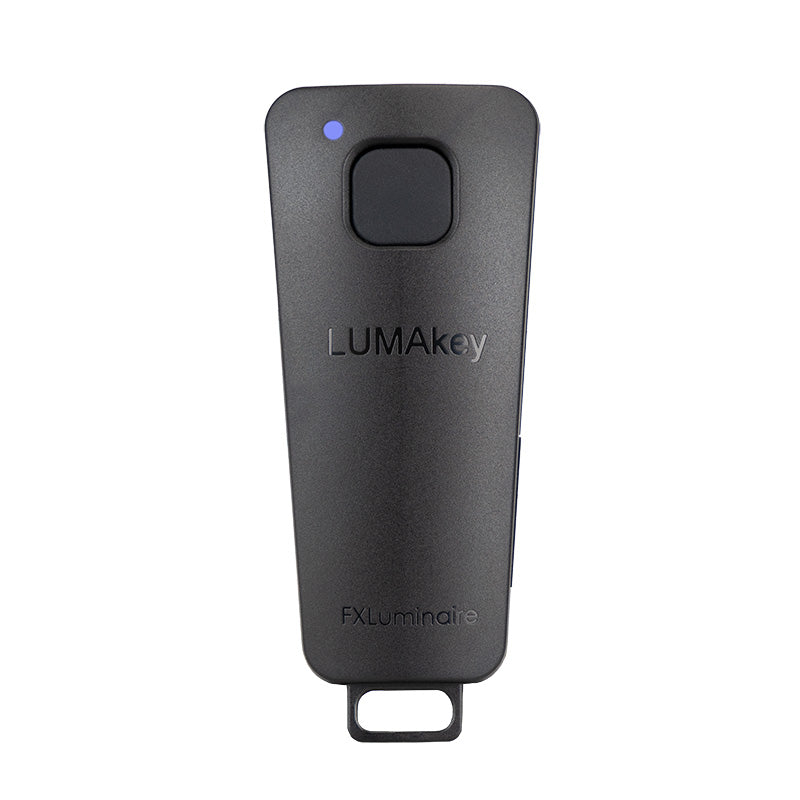
The FX Luminaire LumaKey Utility represents the latest in wireless fixture assignment tools designed for Luxor smart outdoor lighting systems. Featuring ActivAssign Technology, this portable handheld device enables landscape lighting professionals to wirelessly assign Luxor-compatible fixtures to designated zones — no adapters, no headphone jack, and no smartphone necessary. The integrated LED indicator provides a quick visual confirmation of assignment status. Lightweight and robust, it conveniently attaches to a key ring or lanyard for all-day field usage. Bid farewell to cumbersome methods and welcome quicker, more intelligent installations.
The Intelligent Approach to Assigning Luxor Lighting Fixtures in the Field
Stop squandering time on complex fixture assignment alternatives. The FX Luminaire LumaKey™ Utility delivers genuine wire-free ease to every outdoor lighting project. Designed for landscape lighting professionals and integrators who prioritize speed and dependability, the LumaKey™ Utility is the most rapid and user-friendly fixture assignment tool FX Luminaire has ever created.
What Is ActivAssign Technology?
ActivAssign® Technology is FX Luminaire's exclusive wireless protocol that enables any Luxor-compatible fixture to be swiftly assigned to a control group without the need for a smartphone, USB adapter, or headphone jack dongle. Simply bring the LumaKey™ Utility close to the fixture, press the button, and the LED indicator confirms the assignment — instantly.
In contrast to the previous LAM (Light Assignment Module) that required connection to a smartphone's headphone jack, the LumaKey™ Utility operates entirely independently. No app. No phone. No complications.
Key Features & Benefits
• ActivAssign® Technology — Wireless, hassle-free fixture assignment for all Luxor ZD-compatible fixtures
• No smartphone or adapter necessary — Fully independent operation in the field
• LED status indicator — Immediate visual confirmation of assignment success
• Compact, lightweight, and sturdy design — Built for daily professional use
• Key ring / lanyard compatible — Attaches securely for easy accessibility
• Compatible with the entire FX Luminaire Luxor ecosystem — Works with ZDC, ZD, and RGBW fixture lines
• Eliminates installation delays — Assign fixtures more quickly, finish jobs sooner
• Backward-compatible upgrade — Replaces the older LAM module without disrupting workflow
Who Is This For?
• Landscape lighting contractors and installers
• Smart home and AV integrators venturing into outdoor lighting
• Irrigation and outdoor systems professionals incorporating Luxor lighting
• Property managers overseeing existing Luxor ZD lighting systems
How It Works
• Step 1 — Set up your Luxor controller and select the fixture group on the controller or Luxor app
• Step 2 — Hold the LumaKey™ Utility near the fixture to be assigned
• Step 3 — Press the button — the LED confirms assignment status in real time
• Step 4 — Move to the next fixture and repeat — no resets, no reconnections
Compatibility
The LumaKey Utility is compatible with all FX Luminaire fixtures featuring Luxor ZD and ZDC technology, including RGBW color fixtures. It is the recommended replacement for the legacy LAM (Light Assignment Module) accessory. Works in conjunction with the Luxor app (iOS and Android) and all Luxor Wi-Fi and LAN-enabled controllers.
Contractor Buying Checklist
Contractor Buying Checklist
- Confirm fixture type and beam angle for the application.
- Verify transformer capacity for full load plus expansion.
- Match wire gauge and run length to reduce voltage drop.
- Check mounting hardware and connector compatibility.
- For big or mixed orders, use the contact form—quotes depend on stock and margin.